Alcony isn't a prediction market or a chat AI. It's a place to think through real
decisions using decision science: a trade you're watching, a sales territory, a big
purchase. Unpack the paths you're weighing and the specific uncertainties, and you
can track the nuance and the changing conditions for the right time to act.
Alcony builds decades of decision science into the structure, so the discipline comes
built in, not studied. Its building block, borrowed from professional forecasters, is
the forecasting question. Instead of one gut-feel answer ("I think I should stay"),
you break the decision into specific, checkable questions ("Will I get a promising
interview in 60 days?"), predict on each, and revisit as evidence comes in. That turns
a vague worry into a question that gets clearer over time.
The Landscape brings it together: your forecasting questions across time, linked to
the action paths you can take. The probabilities, AI, and math are built in, so you
can focus on the big picture.
Landscape
The whole situation you are trying to understand.
Question
One specific uncertainty inside that situation.
Prediction
Your current best guess on a question. It can be yours, an AI Analyst's, or a friend's.
Outcome
What actually happened, once you know it.
Does This Belong in Alcony?
Check whether your situation needs a landscape first. One test, used both ways:
If your situation is a collection of smaller decisions feeding one macro
goal, and the pieces move together, it belongs here. If it's a single
decision you can resolve once you have the facts, it doesn't need a whole landscape.
A landscape fits
"How a new round of US-China tariffs would move your tech and semiconductor
holdings over the next two quarters." Which positions to trim, hedge, or add all
depend on the same unfolding policy fight. They need to be weighed together, not
one at a time.
A landscape doesn't add much
"Will this position close above $150 by Friday?" One trade call, resolved once the
market moves. It still belongs in Alcony, as a forecasting question on its own,
not a whole landscape.
Facing a single decision? Track it as a question. See
How Forecasting Fits. Weighing several smaller decisions
toward one macro goal? That's what a landscape is for.
Curious why Alcony doesn't work like a chat tool or a forecasting market? See
How Alcony Is Different.
Why the Balcony?
The name comes from a saying we used in business whenever we were stuck in the weeds:
"Let's get up on the balcony!" Three things Alcony fixes, in order:
A pile of advice and analytics isn't a decision
Notes, research, dashboards, and conversations pile up but don't show how the
situation is developing. They're inputs, not decisions.
The hard part is how the pieces connect
Whether you should act depends on several uncertainties moving together, not any
one in isolation.
Decisions get better with feedback
Make an actual prediction, then check it later against what happened. That teaches
you more than a single conversation ever will.
Purpose of a Landscape
A landscape is the decision space for one real situation. It holds the paths you might
take (action paths), the uncertainties you're tracking (questions), and what you've
learned (evidence, including documents). You don't need to fill it all in before it's
useful — most people start with one question and grow into a full landscape.
It works best fully fleshed out and interconnected: every action path covered, every
question linked to the paths it actually moves. That's exactly why Alcony has agents
ready to do that heavy lifting for you — an AI Analyst for predictions, and
the AI Landscaper to draft the whole structure from
your documents. You only need to immerse yourself in the decision.
See the action paths
Name the routes you might take, such as stay, search, renew, negotiate, prepare, or
pause.
See the uncertainties
Turn the unknowns into forecasting questions you can watch, predict on, and resolve
later.
See the relationships
Connect evidence to action paths so you can tell what would make each path more or
less attractive.
What Is a Landscape?
Scope
Not a one-line label — the range of what's in bounds and the purpose it
serves, e.g. "How a new round of US-China tariffs would move your tech and
semiconductor holdings over the next two quarters, so you know when to hedge or
add."
Action Paths
The routes you're weighing: stay, search, renew, negotiate, prepare, pause.
Questions
Your beliefs about the future, sharp enough to check — the kind that would
steer you toward one path and away from another.
Predictions
Your current estimate on each question. Includes AI Analysts and anyone you
invite to contribute.
Evidence
The information relevant to the predictions.
How Forecasting Fits
Two entry points, same underlying tool:
Start with a landscape
When your situation sounds broad, with several moving parts.
Should I hold, add to, or exit this position?
Should I stay at my job or look for something else?
Should I move, renew my lease, or negotiate?
Start with a single question
When you have one narrow, resolvable uncertainty.
Will this stock trade above $150 by Friday?
Will I hear back from this job by Friday?
Will my rent increase by more than 5% at renewal?
Either way, you end up with questions you can predict on and revisit.
A landscape tracks several of them together, along with the paths and evidence that
connect them.
How Alcony Is Different
You might expect Alcony to work like a chat tool or a forecasting market.
A chat or AI research tool
Can reason through a question with you and hand back an answer. That's useful for
a single point decision. But once it answers, it's done. It won't notice when your
loan rate changes next month, or how that connects to what else you're weighing.
A forecasting or prediction market
Turns what a crowd believes into a single number, often by having people bet on
it. That number can be an accurate read on one outcome. But it only asks about one
outcome at a time, then stops.
Alcony watches the whole situation, not one question. A landscape holds your beliefs,
your evidence, and how your open questions relate to each other. It keeps that
decision space current as conditions change. Instead of asking what's likely to
happen, it asks whether you're ready to act, and on which path.
That's what a single prediction can't give you: seeing how everything moves together.
Create a Landscape
Goal: turn a messy situation into a working landscape in a few minutes.
From the Dashboard, click New Landscape.
You'll land on a blank prompt: "What's on your mind?" Type the situation in your own
words. Messy is fine. Click Tell Alcony.
Alcony may ask a few follow-up questions, then proposes a scope. It walks you
through the rest: a set of action paths, a first round of forecasting questions as
editable cards, and a way to link them.
Keep what's useful, edit or delete what isn't, then confirm to create the landscape.
It's quick, and everything can be modified later. Brainstorm freely: getting started
is the most important step.
Once created, the landscape detail page shows three stat boxes (Questions, Actions,
Decision Readiness), the Action Trigger Matrix, and a Timeline
of your questions colored by Open / Resolved / Awaiting outcome.
+ Add question adds a new question to the landscape, and
Link existing attaches a question you created elsewhere.
The Balcony View (on the right) builds a written read of the whole
landscape. Once it's built, the button reads Open the Balcony View.
See The Balcony View.
Share invites others to view the landscape (see Invite People).
The pencil icon opens Edit landscape: its name and scope, its
Urgency (see Read the Action Trigger
Matrix), your Notes, Assumptions and Constraints, and the
Archive and Delete buttons.
Already have the material — reports, memos, pipeline data — instead of just
an idea? The AI Landscaper reads your documents and
builds the whole landscape for you.
The AI Landscaper Public Preview
Goal: turn a pile of documents into a complete, ready-to-review landscape —
framing, action paths, forecasting questions, and the links between them —
without building it by hand.
Public preview. Available to try today from the Landscapes page
— no request needed. Expect some rough edges while we keep building it out.
If it's relevant, drop it in. Reports, memos, spreadsheets, policy documents, call
notes, pipeline exports — the Landscaper reads everything you give it and
proposes a full landscape from it. You review and edit before anything is created in
your account.
This is different from the free-form way of creating a landscape above.
New Landscape (the "Tell Alcony" prompt) is for getting started
when you're still shaping the situation yourself. You talk it through with your AI
Analyst from a blank page. It's free.
The AI Landscaper ("Build from documents") is for when you
already have the material. It does the whole pass for you — framing, every
action path, a full set of forecasting questions, and how they connect —
instead of proposing one piece at a time. It costs 250 credits.
How to use it
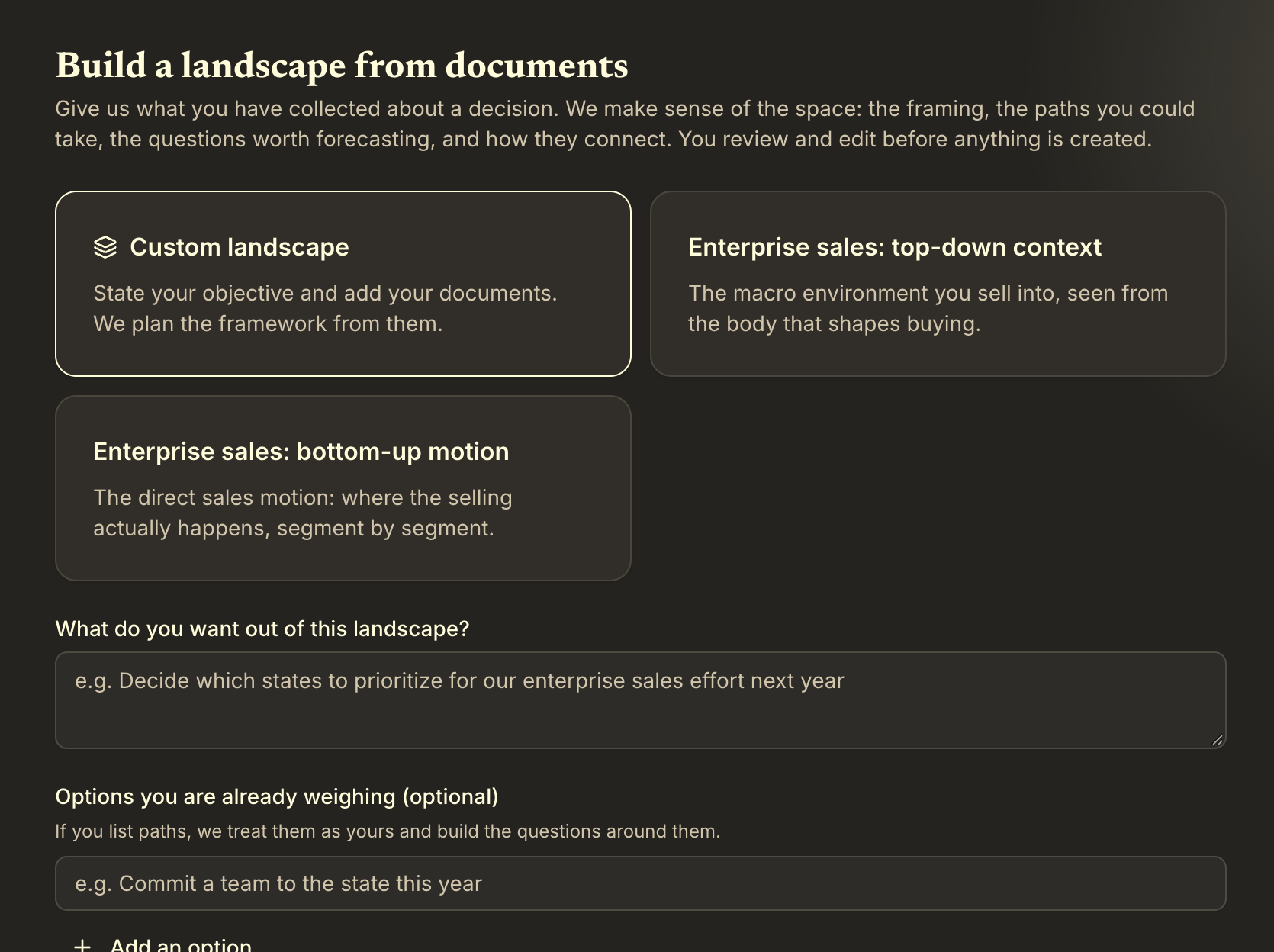
From the Landscapes page, click Build from documents
(next to New Landscape).
Build from documents sits next to New Landscape at the top of the Landscapes page.
Pick a template if one matches your situation (see below), or choose
Custom landscape to let the Landscaper plan the framework from your
documents alone.
Under What do you want out of this landscape?, describe your goal in
a sentence or two (for example, "Decide which states to prioritize for our
enterprise sales effort next year").
If you're already weighing specific options, list them under Options you
are already weighing, using + Add an option for each one.
The Landscaper treats them as your action paths and builds its questions around
them instead of inventing its own. This is optional.
Pick a template or Custom landscape, state what you want out of it, and list any options you're already weighing.
Drop in your documents (see accepted types below).
Click Start. This charges 250 credits (see Track Credits).
The Landscaper works through your documents in stages. If something is ambiguous, it
pauses with a short checkpoint question — answer it or skip, and the build
continues.
Review the draft: the framing, every action path, the full set of forecasting
questions, and how they link together. Edit anything before applying —
including a question's links (change the outcome or threshold, unlink it, or link
it to another path) and its units.
If anything needs fixing first, the bar at the bottom says how many issues are left.
Click it for the list; each issue names the question or path involved and takes
you to the place where you fix it.
Click Apply landscape to create the real landscape. Nothing is
created until this step, and applying spends no credits.
Only broken links left? If the only remaining issues are links the
Landscaper couldn't get right, you can click Create and skip N broken
links instead. The landscape is created without them, and they're listed
under Links to review on the new landscape: click
Link to set each one up yourself, or dismiss it.
What you can drop in
PDF, Word (.docx), plain text, CSV, Excel (.xlsx), Markdown, HTML, email (.eml), or a
.zip folder containing any of these — drop in a whole folder and it unpacks it.
Up to 40 files per build, 50MB each, 500 pages of text total across all of them.
Scanned PDFs aren't read yet. A PDF made from a scan or a printout
(pages that are images, with no selectable text) is turned away with "no extractable
text". Export the original as a PDF with text, or as Word or plain text, and add that
instead.
Templates
A template doesn't pre-fill answers — it tells the Landscaper how to reason
about a specific kind of situation, so it asks sharper questions and covers the
ground that kind of decision usually needs. Two are available today, both for
enterprise sales:
Enterprise sales: top-down context
A top-down view of your territory itself: the policy, regulatory, and other macro
forces shaping whether it's worth selling into at all — before you get into
any one deal.
Enterprise sales: bottom-up motion
Builds up from your accounts and business units into one holistic view, so you can
prioritize across them with everything weighed together.
No template fits every situation. Choose Custom landscape and the
Landscaper plans the framework from your objective and documents alone.
Credits
A full build costs 250 credits, charged when you click Start.
If you cancel before the draft is ready to review, you get the 250 credits back
automatically.
Once the draft is ready for review, the charge is final — even if you end up
discarding it instead of approving it.
Read the Action Trigger Matrix
Goal: see which action path is ready, and what's still missing.
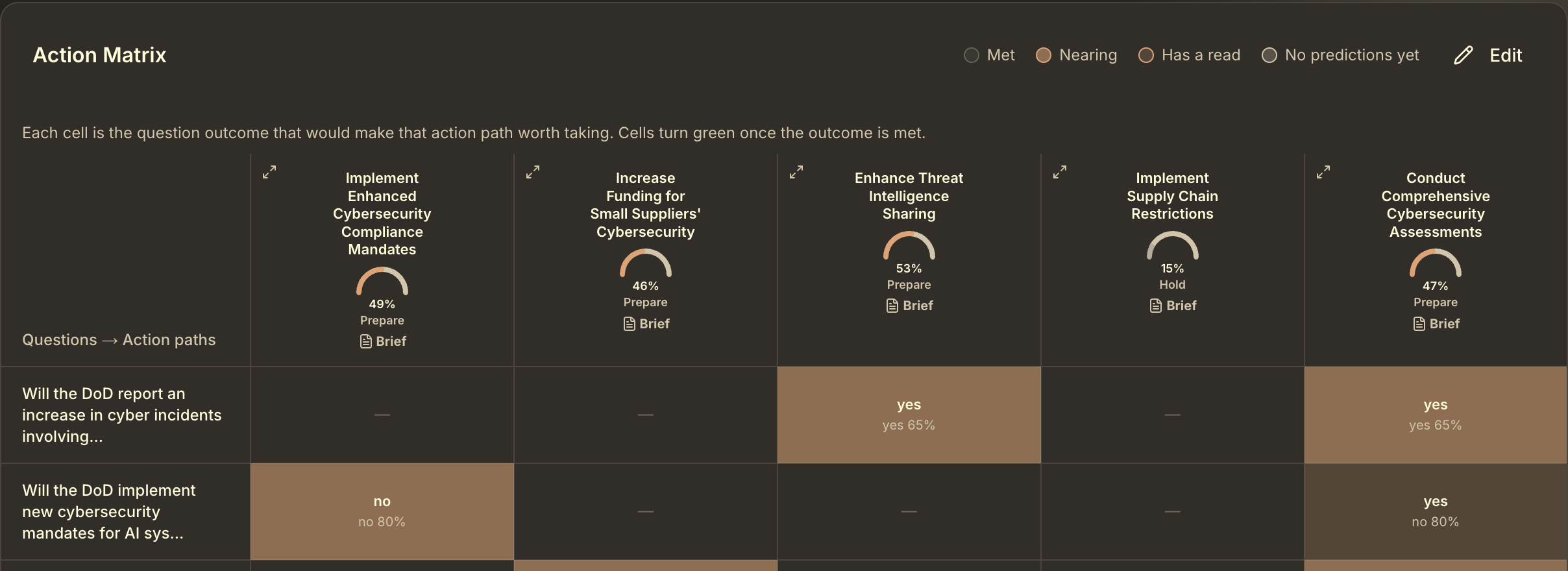
Every landscape has an Action Trigger Matrix: a grid with your forecasting questions
down the side and your action paths across the top. Each cell answers one question:
what does this question need to show for this action path to make sense?
It's the piece that turns a pile of forecasts into a "so what do I actually do."
Each path's gauge shows its readiness and posture; filled cells are the outcomes that would make that path worth taking.
Reading a cell
A filled cell shows the outcome that matters for that path on top (for example
"yes"), and the current forecast underneath (for example "yes 65%"). A dash means
the question isn't linked to that path. The legend above the matrix explains the
colors:
Met (green): the outcome is met.
Nearing (dark orange): the forecast points to the outcome this link
is watching for. For a number question, the forecast value is already on the watched side of the threshold.
Has a read (light orange): there are forecasts, but they point away
from the outcome this link is watching for.
No predictions yet (tan): linked, but nothing to judge yet.
Hover any filled cell for the question text, the exact trigger (a threshold for
number questions, an answer for yes/no, an option for multiple choice), and the
current urgency. Each action path column also shows a readiness gauge: how close that
path is to triggering, across every question linked to it. A path whose linked
questions have no forecasts yet shows a dash until someone predicts.
What the gauge's label means
Under each gauge is the path's current posture:
Act now: the forecasts say this path is ready to decide on.
Prepare: it's building. Get ready, but the signal isn't there yet.
Wait or Hold: not close yet. Keep watching.
Gather evidence: too many of the forecasts behind this path are
out of date to judge it. Update them before trusting the gauge.
Urgency: how strong a signal you need
Set Urgency in Edit landscape. It applies to every
link in the landscape at once, and decides how likely an outcome has to be before
it counts as met:
Low — wait for strong signal
Medium (the default)
High — act on limited signal
Urgency also moves where the Act now / Prepare / Wait lines fall: a high-urgency
landscape reaches Act now sooner.
Editing the matrix
Click Edit (the pencil icon) to enter edit mode (requires ownership on the landscape).
Click any cell to open the link dialog. For number questions, set a threshold and
direction (e.g. "greater than 5,000"). For yes/no or multiple choice, pick the one
answer that matters for this path, e.g. "When CPI rises above 3%, sell."
A question has one link per path, and it can point to a different answer for each
path.
Add an action path with the button at the bottom of the matrix. Remove an action
path or question with the × above its column or row.
Warning: removing either breaks all the links and thresholds
you've set for it.
This is where the landscape earns its name. Questions alone tell you
what's uncertain; the matrix tells you which uncertainty changes what you'd do.
The Balcony View & Action Briefs
Goal: get a plain-language read of where the whole landscape stands, and the case for
and against each action path, without piecing it together cell by cell.
The matrix shows you which paths are getting ready. The Balcony View tells
you why: what the forecasts add up to, what changed since you last looked,
and what deserves your attention. It never tells you what to decide.
Build it
Open a landscape and click The Balcony View at the top of the
page. The first build costs 15 credits.
It builds in the background (the button reads Building the Balcony
View…). Once it's ready, the button changes to Open the
Balcony View and opens it in a side panel.
When the landscape changes, the panel says so at the top. Click
Refresh to bring it up to date. It costs 15 credits.
Only the landscape's owner can build or refresh it.
What's in the Balcony View
The terrain: your questions grouped into themes, with a short
read of each. Rename a theme, or click Regroup questions to move
questions between themes. Your changes are kept every time it refreshes.
Action paths: each path with its readiness to decide. Click a
path's name to open its Action Brief.
What changed since the last view.
Pay attention: the things most worth your time right now, in order.
The tables (click to expand): the evidence behind the view.
Established facts, beliefs (what the forecasts say), where viewpoints agree or
conflict, your assumptions checked against the evidence, and an uncertainty and
risk register.
Action Briefs
Every action path gets an Action Brief. Open one by clicking a path's name in the
Balcony View, or the Brief button on that path's column header in
the matrix. Each brief has:
The case for taking this path.
The case against it.
Readiness to decide: one of Not enough to decide yet,
Enough to decide, or Time-sensitive, with what would make you
ready and the one unknown that would most change the picture.
A brief is marked out of date when that path's questions have changed since it was
written.
Keep it up to date automatically
In Edit landscape, turn on Keep the Balcony View up to
date. It refreshes as often as the most frequently
automatically updated question in the landscape, or weekly
if none are scheduled. Each refresh costs 15 credits, and it's skipped, at no charge,
when nothing changed or your balance can't cover it.
If a build or refresh fails, your credits are refunded automatically.
Your individual predictions stay private. The Balcony View works
from the combined forecasts. No one person's prediction is sent to the AI, and
predictors' names are kept out of what it writes.
Create and Track a Question
Goal: turn one uncertainty into a question you can predict on and revisit.
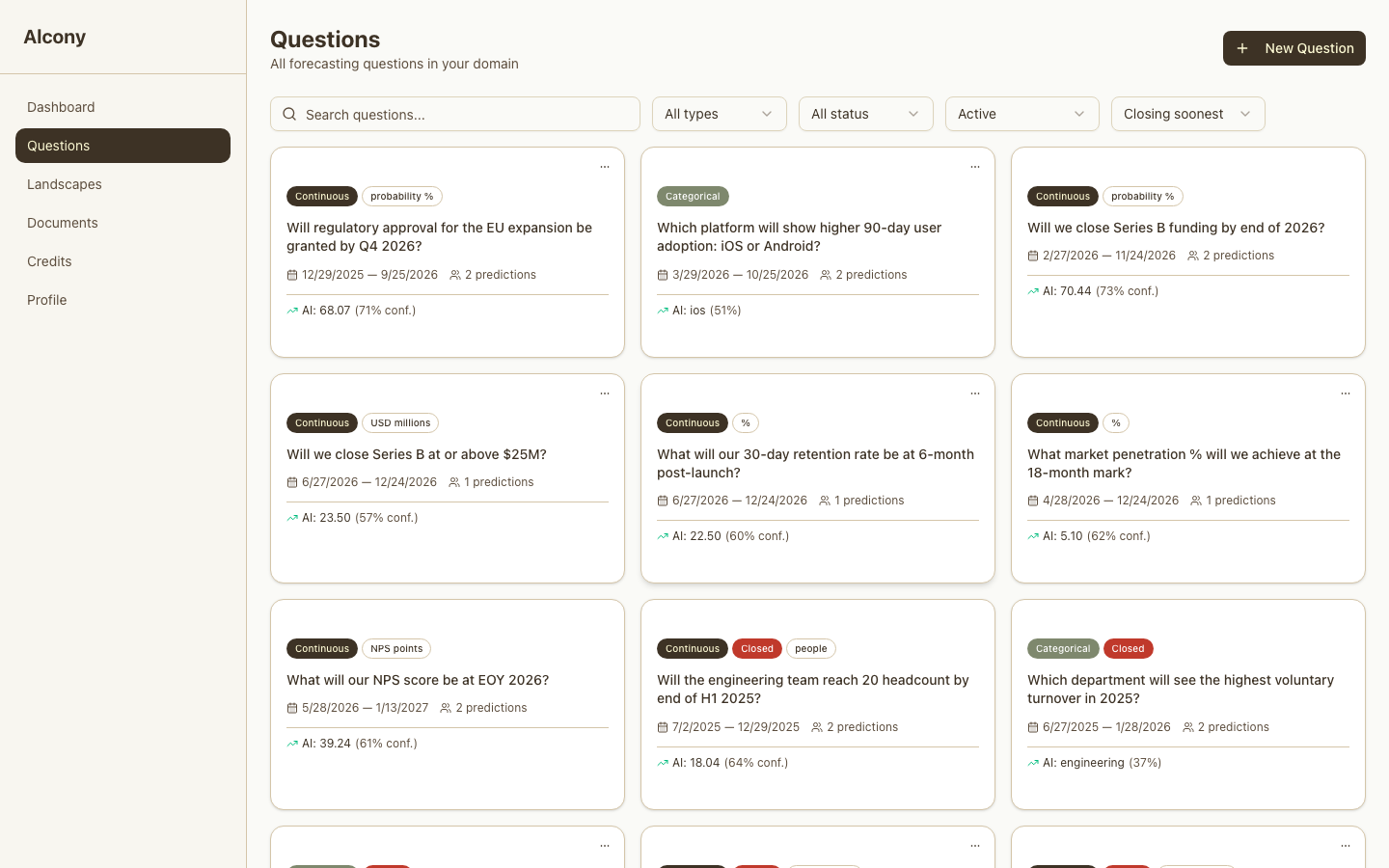
From Questions, click New Question (or + Add question from inside a landscape).
Type a rough version of the question. Alcony suggests the question type (yes/no,
multiple choice, or a number), an end date, units, and categories. All editable.
Create is disabled until the question validates (it needs a clear end
date and, for number/category types, units or categories).
Get the wording right before anyone predicts. Once a question has a
prediction, whether from a person or an AI Analyst, its wording, dates, type, units
and options are locked for everyone. Changing them would change what people already
predicted on. The edit sheet shows locked fields as read-only.
Reading a question card
The badge shows type: Continuous (a number) or Categorical (multiple choice).
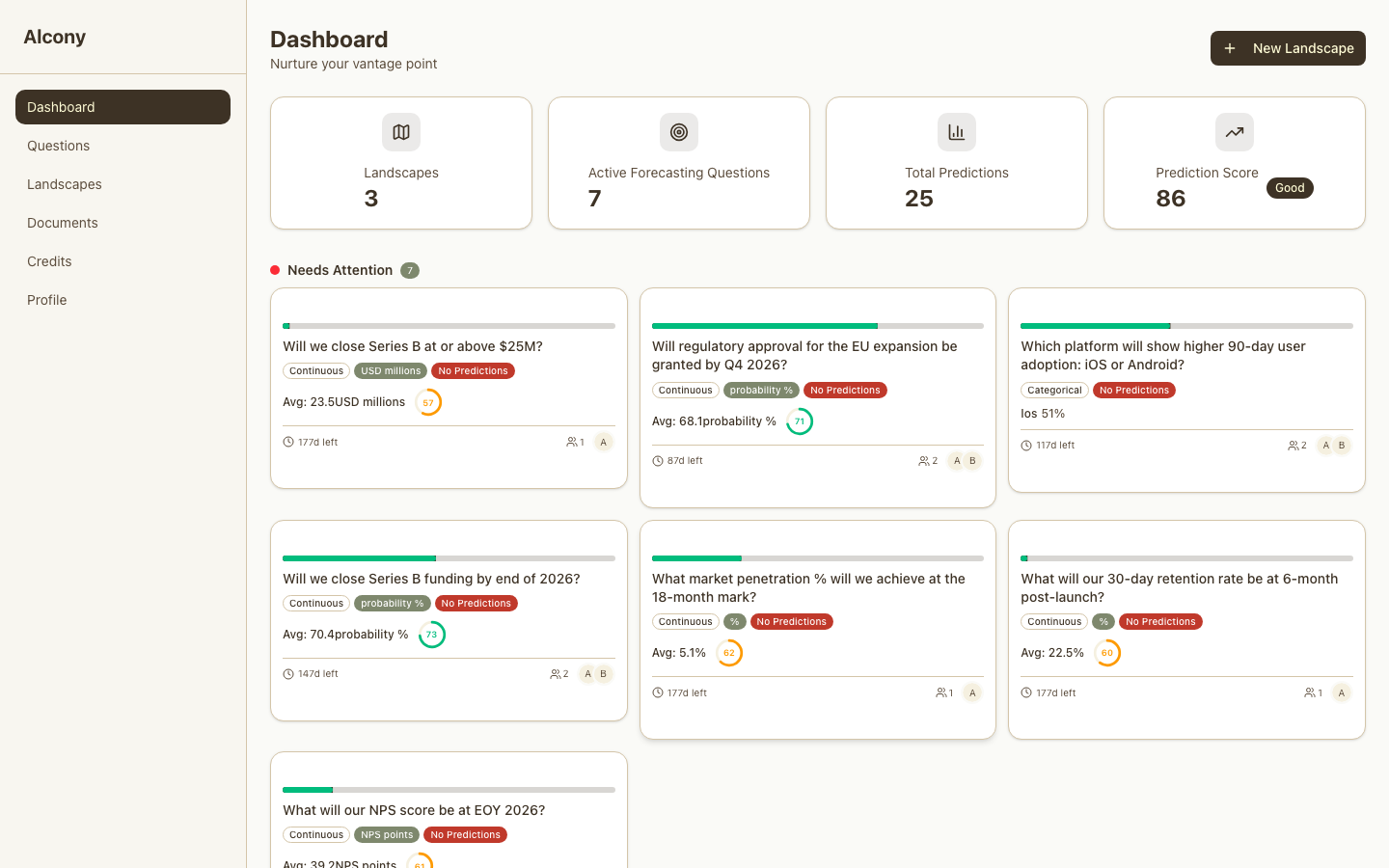
The thin bar across a dashboard card's top shows time elapsed, not answer quality:
green means 7+ days left, amber means 3 to 7 days
left, red means 3 or fewer.
A Closed badge means the question has resolved.
Your Dashboard, with cards grouped by urgency.Red "Closed" badges mark resolved questions in list view.
Your Dashboard groups questions into three sections
Needs Attention
Needs focus. It needs more predictors (the power of crowds), has low confidence, or is coming up soon.
Monitoring
Active, not urgent. It's working: keep track and update as needed.
Completed
The question has resolved.
Make and Update a Prediction
Goal: record what you currently believe, and update it as things change.
Open a question, click Make Prediction (or Update Prediction if you already have one).
Enter your estimate: a probability, a number, or a category, depending on the question type.
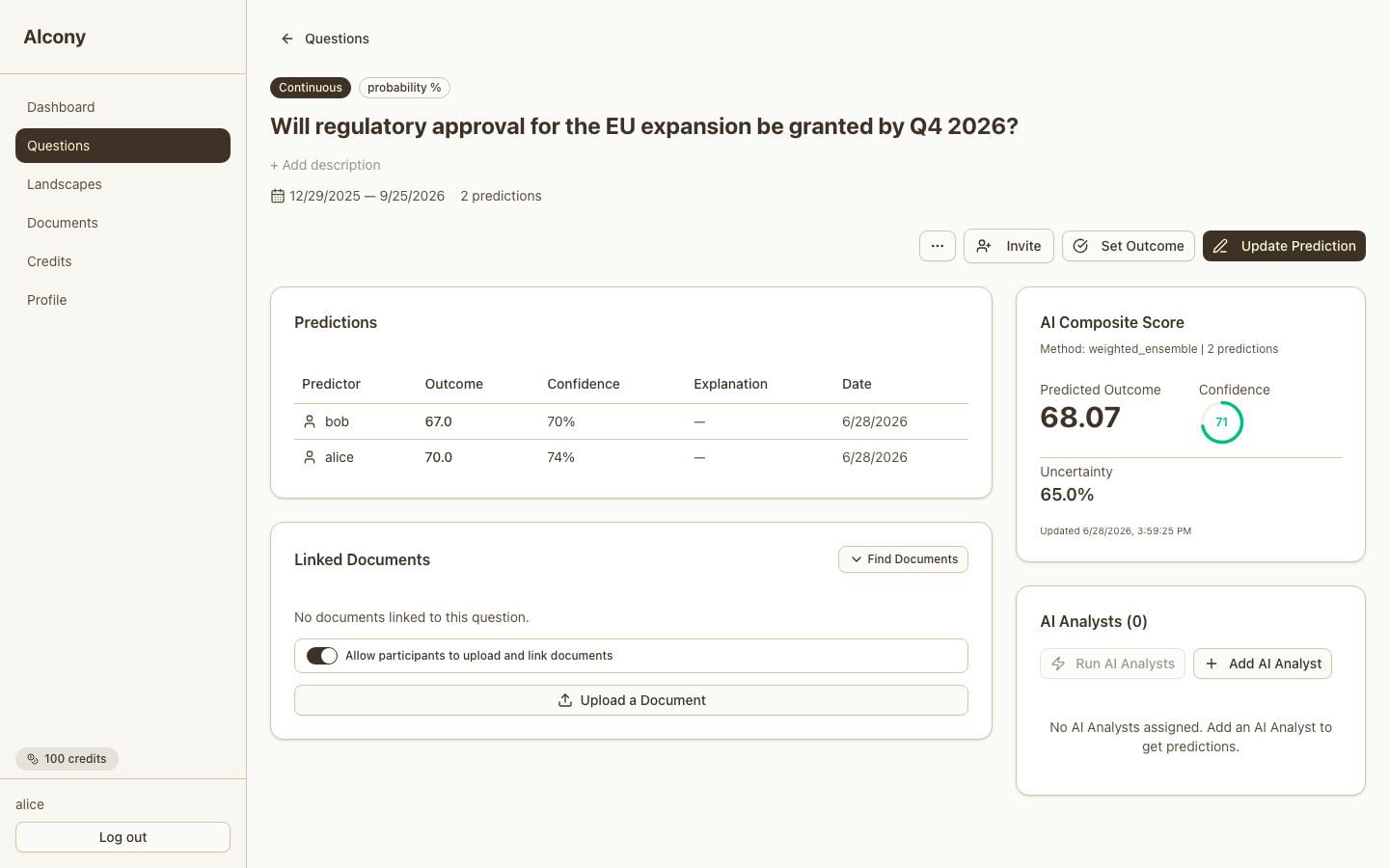
Every prediction you and others make shows up in the Predictions table
(Predictor, Outcome, Confidence, Explanation, Date). Human and AI Analyst predictions
sit side by side.
The AI Composite Score panel next to the table shows everyone's
combined predictions, plus an uncertainty percentage.
The Predictions table, alongside the AI Composite Score panel.
Revisit a question whenever something changes: new information, a closer deadline, or a
friend or AI Analyst disagreeing with you.
Invite a Predictor
Goal: bring in another perspective without it feeling like "share this app."
Open the question and click Invite.
Your invitee gets access to that question, including any existing predictions, and
can add their own view.
Optionally, let invited predictors upload documents to the question, via a toggle on
the question page.
Good invite message
"I am trying to think this through on Alcony and would really value your perspective.
Could you add your view to this question?"
Good people to invite
Friends who know the situation and will be honest with you.
People with lived experience or domain expertise.
People who care about how the landscape turns out.
Prediction invites draw from the same 30-invite beta budget as everything else. See
Invite People.
Use AI Analysts
Goal: get a structured second (or eighth) opinion, not a magic answer.
On a question, click Add AI Analyst. Alcony recommends 5 analysts
to start: a mix chosen to cover different angles, so you get a spread of viewpoints
without picking blind. Each analyst approaches the question differently. Some map
what limits the outcome, some follow incentives, some watch how beliefs spread, some
hunt for the surprise scenario (see
Meet the AI Analysts). Want more? Extend to the full
roster and toggle each Active or Disabled.
Click Run AI Analysts. The button shows the live credit cost before you
confirm: each enabled analyst costs 1 credit. If your balance is too low, the button
disables itself and tells you so.
Results land as new rows in the same Predictions table as human predictions, with no
separate report or chat view. A Recent AI Analyst Runs list shows each
run's status (queued, running, succeeded, failed, refunded).
Costs credits: 1 credit per analyst run, framework analysts and
proprietary models alike. Everything else on a question (creating it, predicting
yourself) is free. See Track Credits for the full picture.
How to read them
Compare probabilities and reasoning, not just conclusions.
Notice what assumptions each analyst is making.
Only update your own prediction when one changes your mind.
Keep your judgment
They are not guarantees or personal advice.
They don't replace your own judgment.
A failed run is refunded automatically.
Meet the AI Analysts
Every analyst looks at the same question but starts from a different place. The best
results come from picking two or three with different viewpoints and
comparing their reasoning. Analysts marked (numbers) answer number
questions with a point estimate; the rest weigh in on yes/no and multiple-choice
questions. If the framework names mean nothing to you, skip them: the Use
when on each analyst is all you need to pick well. A few, grouped separately near
the bottom, aren't written frameworks at all: they're Alcony's own fine-tuned
forecasting models.
The structure of the situation
"What limits what's possible here?"
MECE Analyst: Maps every possible outcome first; won't put numbers on anything until nothing is missing. Use when: you're worried you haven't listed every way this could go.
SWOT Analyst: Weighs your internal strengths and weaknesses against outside conditions. A great opportunity means little if the weakness column is long. Use when: you're deciding whether you're well-positioned to pull this off.
PESTEL Analyst: Looks for the one or two big outside forces (political, economic, social, legal) that decide the outcome. Use when: an election, a rule change, or the economy could swing your question.
Porter's Five Forces Analyst: Believes the structure of a market matters more than any one player's effort; asks who holds the power. Use when: your outcome depends on a market with competitors, suppliers, or gatekeepers.
3 C's Analyst: Checks whether you, your customers, and your competition line up; a plan that ignores the competitor's response is incomplete. Use when: success depends on customers choosing you over a rival.
Market Entry Analyst: Barriers first: is there a realistic path in before the window closes? Optimistic sizing doesn't count until the barriers clear. Use when: you're entering something new and aren't sure the door is really open.
Profitability Analyst (numbers): Follows the unit economics; distrusts any financial story that hasn't been broken into price, volume, and cost. Use when: the question comes down to whether the numbers actually work.
BCG Growth-Share Analyst: Judges a position relative to its market (growing or stalling, leading or trailing) and what that combination usually predicts. Use when: you're judging whether a product or position is worth backing further.
Marketing Mix Analyst: Weakest-link thinker: the weakest part of a go-to-market plan sets the ceiling for the whole thing. Use when: something has to sell, and you want the weak spot found first.
McKinsey 7S Analyst: Organizational friction detector: misalignment between a plan and the people, culture, and systems meant to execute it predicts failure. Use when: the plan depends on an organization actually executing it.
Incentives
"Who benefits, and what will they actually do?"
General Incentive Analyst: Ignores what people say they'll do and maps what they're actually rewarded for doing. Use when: the outcome depends on what other people choose to do.
Incentive Quantitative Analyst (numbers): Same lens, but sizes the effect: how much behavior actually changes given the incentives. Use when: you need a number on how much behavior will actually shift.
Beliefs and stories
"What do people believe, and how is that changing?"
Narrative Analyst: Tracks whether an idea will spread based on how catchy and emotionally charged it is, not how true. Use when: hype, buzz, or public opinion could drive the outcome.
Narrative Quantitative Analyst (numbers): Estimates how far and how fast a story travels, anchored on how similar stories have spread. Use when: you need to estimate how far and fast the buzz travels.
Getting people to move together
"Can enough people get on board in time?"
Adoption Analyst: Skeptical that early enthusiasm turns into mainstream uptake; looks for proof that ordinary users, not just enthusiasts, are moving. Use when: the question is whether something new actually catches on.
Adoption Quantitative Analyst (numbers): Puts a number on uptake, disciplined by how fast comparable things have spread. Use when: you need uptake as a number, not a vibe.
Organizational Behavior Analyst: Assumes organizations resist change by default; asks who informally holds veto power and who benefits from the status quo. Use when: a company, team, or bureaucracy has to change for this to happen.
Leadership Analyst: Asks whether people follow this leader voluntarily or just comply, and whether the plan depends on one person staying. Use when: the outcome rides on one person's pull, or on them staying.
Timing and change
"How does this play out over time?"
Three Horizons Analyst: Separates short-term shocks from slow structural shifts, and names which one drives your question's window. Use when: you're not sure if this is a blip or a real shift.
Scenario Matrix Analyst: Maps the handful of futures that matter and names the trigger event that would tip you from one to another. Use when: several futures feel plausible and you want the tipping points named.
Adaptation Rate Analyst (numbers): Realistic about speed: systems usually change at their historical pace unless something specific accelerates them. Use when: your timing depends on how fast a system can actually change.
Human bias
"Where will people, including you, predictably misjudge this?"
General Behavioral Analyst: Audits which biases are active in the situation: fear of loss, following the crowd, wishful timing. Use when: you suspect emotion, including your own, is steering the read.
Behavioral Quantitative Analyst (numbers): Estimates how large those bias effects are, anchored on published research. Use when: you want those bias effects sized, not just named.
World events
"How do politics and global forces bear on this?"
Geopolitical PESTEL Analyst: Treats political will as the deciding variable; economics and law mostly constrain what leaders can do. Use when: governments or geopolitics could decide your question.
Country Risk Analyst: Trusts a country's fundamentals (debt, institutions, unrest) over official statements and diplomatic signals. Use when: the outcome hangs on a particular country staying stable.
Geopolitical Alpha Analyst (numbers): Asks what markets have already priced in, and what shock they're underestimating. Use when: you're trading on world events and wonder what's already priced in.
Surprises
"What unlikely event would change everything?"
General Tail Risk Analyst: Hunts for the scenarios that would prove the consensus wrong, and makes sure none is quietly rounded down to zero. Use when: being wrong would be expensive and you want the blindside checked.
The generalists
"How do situations like this usually turn out?"
General Categorical Analyst: Starts from base rates, how often things like this happen, before adjusting for your specifics. Use when: in doubt: a solid first analyst on almost any question.
General Quantitative Analyst (numbers): Anchors on historical ranges and distrusts extrapolating recent extremes. Use when: you need a number and history is the best guide.
Borrow a specific thinker's lens
"How would this particular thinker size up the situation?"
Charlie Munger's Framework Analyst: Reasons from a latticework of models across psychology, economics, and biology, then stress-tests its own conclusion by inverting it. Use when: you want the question examined from several disciplines at once, not just one theory.
Charlie Munger's Framework Quantitative Analyst (numbers): Same multidisciplinary, invert-first approach, sized as a number. Use when: you want that multi-angle read as a number.
Ray Dalio's Framework Analyst: Separates what's objectively true from what people wish were true, then weighs opinions by track record instead of by volume. Use when: you're getting mixed signals and want them weighted by who's actually been right before.
Ray Dalio's Framework Quantitative Analyst (numbers): Same track-record-weighted, pattern-recognition approach, sized as a number. Use when: you want that believability-weighted read as a number.
Nassim Taleb's Framework Analyst: Classifies the situation as fragile or antifragile and discounts confident predictions from people who have nothing on the line. Use when: being wrong would be expensive and you want the tail risk taken seriously.
Sun Tzu's Framework Analyst: Believes most outcomes are decided by positioning well before the moment of decision, not by effort in that moment. Use when: you suspect the outcome was already set up in advance and want that checked.
Carl Jung's Framework Analyst: Splits the evidence into what people say and what they actually do, and trusts the done side more when the two disagree. Use when: someone's stated intentions and their actions don't quite line up.
Viktor Frankl's Framework Analyst: Names the real driver behind an actor's behavior, then checks whether they actually have the freedom to act on it. Use when: motivation is clear but you're not sure anything is actually standing in the way.
Marcus Aurelius's Framework Analyst: Splits every factor into what the actor controls and what they don't, and checks whether their effort is aimed at the right one. Use when: you want to know how much of this is really in anyone's hands.
Esther Perel's Framework Analyst: Reads the pull between wanting stability and wanting growth, and separates the real problem from its symptom. Use when: the question involves a relationship, family, or trust dynamic.
Brené Brown's Framework Analyst: Separates genuine motivation from performing for an audience, and reads the gap between the two. Use when: you suspect someone's stated reason for doing something isn't their real one.
Good to Great Analyst: Runs a five-point execution check (leadership, people, reality, alignment, model) before trusting any strategy. Use when: you want to know if an effort can be executed, not just whether the plan sounds good.
Blue Ocean Strategy Analyst: First decides whether you're in a contested market or genuinely open space, then applies the logic that fits. Use when: you're not sure whether you're really competing with anyone.
The Innovator's Dilemma Analyst: Classifies the situation as sustaining or disruptive, then checks whether strategy and resources match it. Use when: an established player is being challenged by a cheaper or simpler alternative.
Thinking in Bets Analyst: Judges the quality of the decision process rather than how things happened to turn out, and widens its estimate when luck plays a bigger role. Use when: you want the process judged, not just the outcome.
Winston's Framework Analyst: Digs for every root cause operating at once, builds a separate case for each possible outcome, and backs whichever case holds up best from first principles. Use when: you suspect more than one thing is driving this and want each explanation stress-tested on its own.
Alcony's proprietary forecasting models
Alcony fine-tuned models, designed specifically for forecasting questions. Expect
about 2 minutes to get a result: slower than the framework analysts above, but worth
the wait.
Dr. No: Sees only the question, no crowd forecast, no research context. Predicts "no" by default (mostly), but every "No" prediction comes with a highly-calibrated confidence estimate. Use when: you want an outside check that isn't anchored on what everyone else already thinks: Yes/No questions only.
Binary Forecaster (crowd-aware): A fine-tuned model that considers the crowd forecast before answering. Use when: you want an early read prediction that accounts for the crowd average belief: Yes/No questions only.
Categorical Forecaster: The multi-option forecaster. Based in historical pattern matching and leverages the crowd's spread and live research context. Use when: more than two options and you want a pattern-based read.
When analysts disagree, that's the point. Different viewpoints surface
different assumptions. Compare the reasoning, check the assumptions against your
situation, and keep your own judgment. Predictions from different viewpoints make the
overall composite score better.
Set an Outcome
Goal: close the loop once you know what actually happened.
Open the question once you know the answer (it doesn't have to have hit its end date).
Click Set Outcome, choose the real result.
The question moves to Closed / Completed, and your score updates based on how your
predictions tracked the outcome.
Turn On Automatic Updates
Goal: let Alcony watch a question and keep it current, without you doing the research.
Open the question, click Edit, and turn on Tracks a
publicly verifiable event. This only works for questions with a real public
source: an election, a market price, a published report. A question like "Will I get
the job?" has no source to check, so leave this off for personal questions.
Turning this on also unlocks topic tags. Tag the question (Politics, Economics &
Finance, Company Internal, and more) so your prediction score breaks down by topic
on your profile later.
A Scheduling panel appears on the question. Turn on
Automated updates and pick a cadence: daily, weekly, monthly, or
once the question is past its end date. Each run costs 10 credits — cadence
multiplies this, so daily is a lot more than weekly.
On each run, Alcony searches for new public information and folds it into the
question. Turn on Also run AI analysts after each update if you
want new predictions alongside the fresh research.
When Alcony is confident about what happened, it sets the outcome and closes the
question for you. When it's less sure, it leaves a Suggested outcome
card with its reasoning. Review and accept it, or dismiss it and let the next
scheduled run try again.
Costs credits: 10 credits per automated update run. Turning on
Also run AI analysts after each update adds 1 credit per analyst. See
Track Credits for the full picture.
Uses credits like an analyst run
If your credit balance runs out, automated updates pause on their own. Add credits
and turn the switch back on to resume.
You stay in control
Alcony only closes a question when it's confident. Anything less certain waits for
you to review it first.
Add Context: Documents
Goal: ground a question or landscape in real information instead of memory.
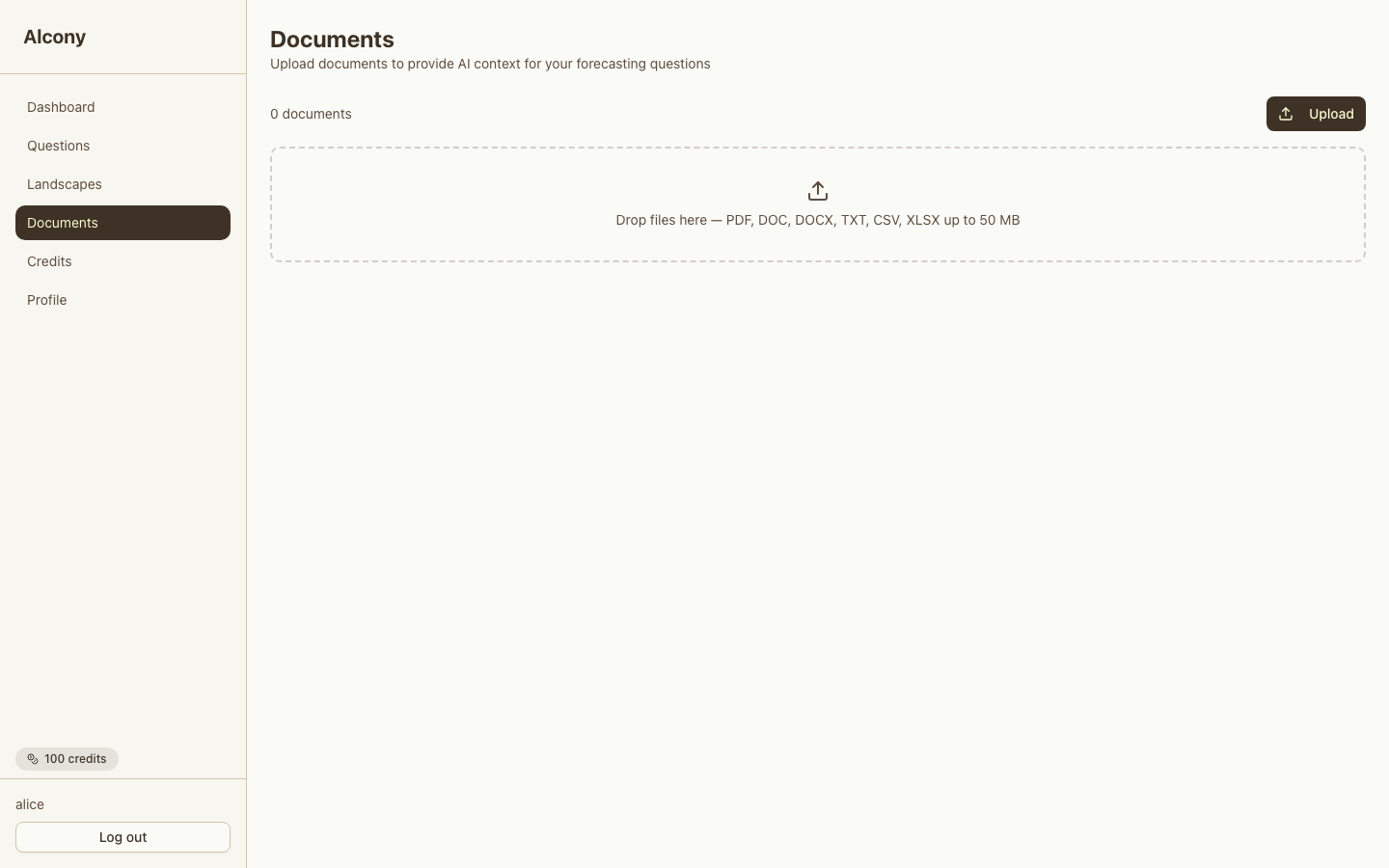
Go to Documents and drag a file in, or click to pick one: PDF, DOC,
DOCX, TXT, CSV, or XLSX, up to 50MB. Scanned PDFs (pages that are images, with no
selectable text) can't be read yet: use a version with text.
Each file shows a status badge (Queued → Processing → Ready, or Failed) that updates
every few seconds.
From a question page, use Find Documents to link an existing file, or
Upload a Document to add one directly. A question can also allow
invited predictors to upload documents, via a toggle on the question page.
The Documents library, with the upload dropzone and accepted file types.
Invite People
Goal: invite friends to Alcony and share what you're working on.
Three separate flows, sharing one invite budget:
Question invite
Ask one person to predict on a specific question. See Invite a Predictor.
Landscape share
Give someone read access to a whole landscape, from the landscape's Share button.
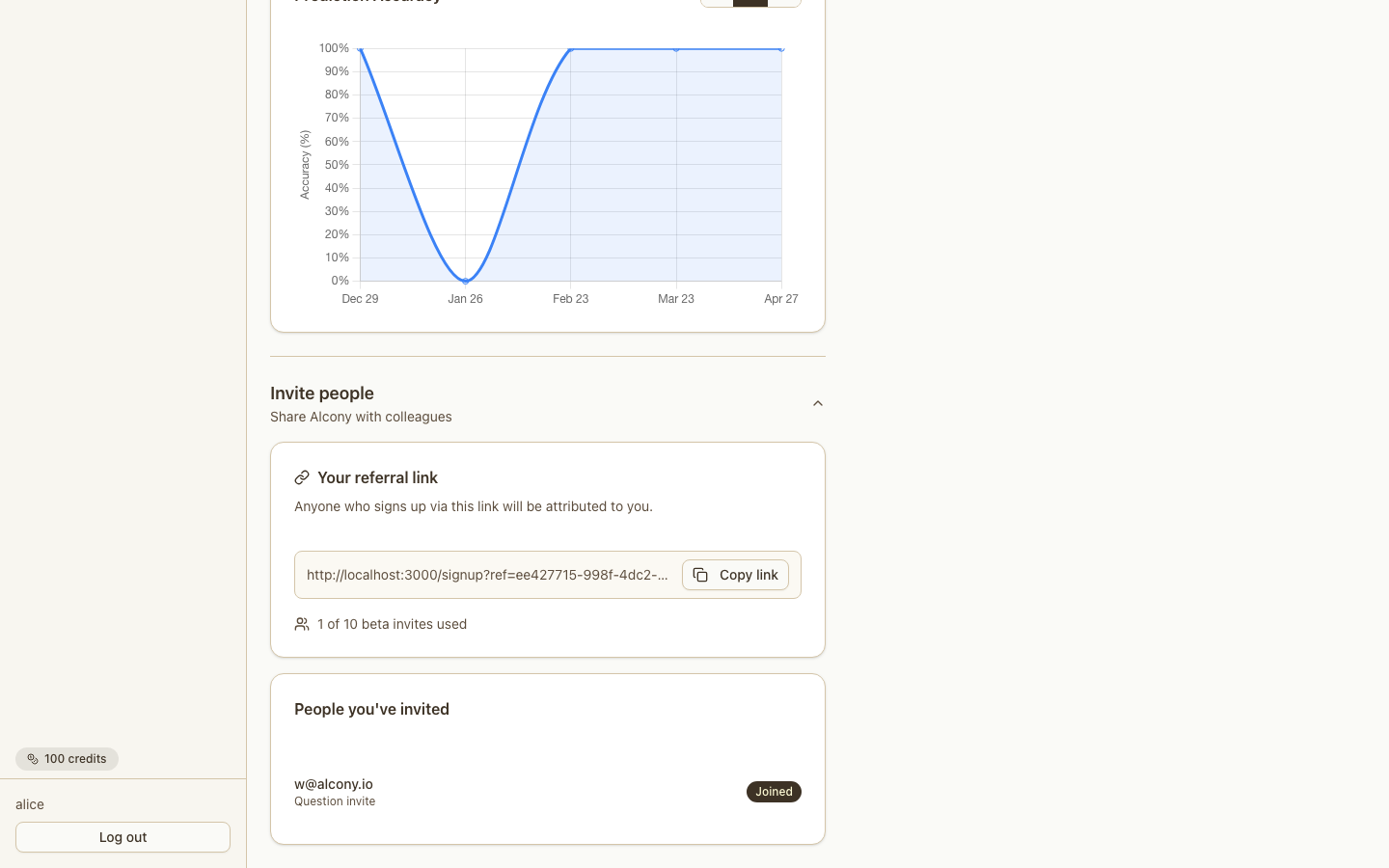
Referral link
Invite someone to join Alcony itself, from Profile → Invite people.
All three draw from the same quota. Beta accounts get 30 accepted invites total,
shown as "X of 30 beta invites used." Once that's hit, sending more requires a
support-side limit increase, with no in-app workaround.
The Profile → Invite people referral flow.
Track Credits
Goal: know what uses credits and how many you have left.
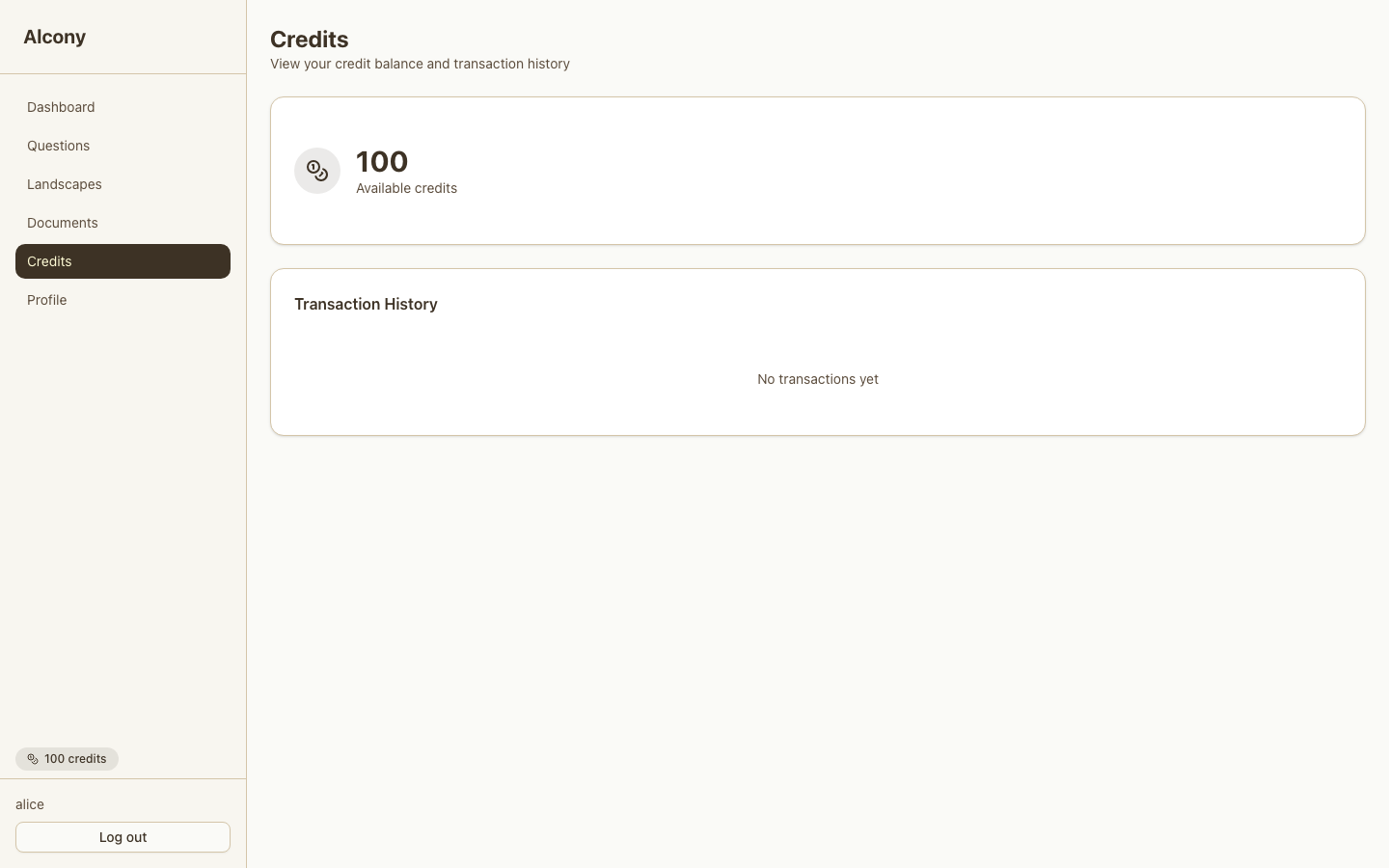
Credits shows your live balance plus a transaction history.
Every account starts with 1,000 credits. They don't expire while your account is
open. Need more? Contact us.
Everything else is free: creating landscapes and questions by hand, making your own
predictions, uploading documents, and guided intake.
1,000 credits is enough to build one landscape and keep it up to date automatically
for a few months.
Your Credits balance and transaction history.
Common Questions
Why should I start with a landscape?
A landscape gets you above the details before you make predictions. If your
starting point sounds like "What should I do?", "Should I stay or leave?", or "How
should I think about this?", create a landscape. Start with a standalone
question only when you have a narrow "Will X happen by Y date?" uncertainty.
Do I need to know forecasting before I start?
No. Describe your situation normally, and Alcony turns it into questions and
predictions.
Can friends see my prediction before making their own?
Yes. Accepting an invite gives full access to the question, including your prediction
and anyone else's. There's no blind step hiding existing predictions.
What should I do when AI Analysts disagree?
This is good. You want different opinions. AI Analysts each approach questions from
their own angle. Treat disagreement as a prompt to check assumptions, not a vote to
settle by picking the most confident one.
Can Alcony update a question and set its outcome for me automatically?
Yes, for questions about publicly reported events. Turn on Tracks a publicly
verifiable event on the question, then set a cadence in the Scheduling panel.
See Turn On Automatic Updates.
How do I switch between light and dark theme?
Alcony frames this as Dawn and Dusk, two times of
day for watching your landscape, rather than a light/dark toggle. Find the switch
near the bottom of the sidebar and click it to move between them. Your choice is
remembered next time you sign in.